Programming & Tech Ecommerce Development
PRINTCART is the trusted digital commerce agency building eCommerce website, mobile app, PWA and Page builder solution for B2C and B2B industries as well as multi-vendor marketplaces
Corporate Printing Portal and Workflow Setup
Corporate Printing Portal and Workflow Setup helps corporate printing teams, agencies, and internal operations teams create controlled ordering workflows for branded print requests. Printcart configures the portal flow around the products your organization needs, such as company gifts, employee kits, event merchandise, business cards, labels, documents, campaign materials, and recurring print requests. The setup can cover product lists, brand rules, approval steps, repeat order logic, shipping rules, and fulfillment handoff so teams can keep brand consistency without rebuilding every request manually. Your team provides brand guidelines, user roles, product options, approval requirements, and shipping rules; Printcart maps those into a practical corporate print workflow. The goal is better control, easier repeat ordering, and a clearer path from request to fulfillment.
Printcart Studio Setup for School and Corporate Photo Workflows
Printcart Studio Setup for School and Corporate Photo Workflows helps school, sports, childcare, event, and corporate studio operators configure batch photo workflows with Printcart Studio AI capabilities. Printcart helps organize setup around face crop, bulk QR cards, AI face matching, subject lists, product types, and fulfillment handoff, using plain production rules your team can review. The workflow is designed for teams that need faster subject tracking, cleaner photo preparation, and clearer batch order handling across portrait, event, ID, badge, school, sports, or corporate photo products. Your team provides event or subject data, photo sets, product rules, and fulfillment requirements; Printcart turns those inputs into an implementation plan. The result is a more structured studio workflow, while final matching and production decisions remain reviewable by your team.
AI Image Upscale and Artwork Fix Service
AI Image Upscale and Artwork Fix Service helps POD sellers, local printers, and customer-upload stores improve low-resolution artwork before production review. Printcart configures an AI-assisted workflow for image upscale, artwork cleanup, and quality checks around the product types and print requirements you support. The service is useful when customers upload small logos, soft photos, or catalog artwork that needs improvement before a team decides whether it is printable. Your team provides sample assets, minimum print requirements, product rules, and approval steps; Printcart maps those inputs into a practical review workflow with before-production checks. The goal is to reduce preventable artwork issues and give operators clearer decisions, while still acknowledging that very poor source images may need replacement or manual design support.
AI Background Removal Workflow for POD Catalog Images
AI Background Removal Workflow for POD Catalog Images helps POD catalog teams, sellers, and marketplace operators clean product photos and listing assets with an AI-assisted workflow. Printcart configures how images move through background removal, review, and catalog preparation so teams can produce more consistent visuals for apparel mockups, product photos, marketplace assets, and storefront listings. The setup focuses on input image expectations, acceptable output rules, and the points where human review should confirm edges, shadows, transparent areas, or brand presentation. Your team provides source images, product categories, marketplace requirements, and approval preferences; Printcart turns those into a repeatable cleanup workflow. The result is faster catalog image preparation and clearer asset quality standards, without promising perfect cutouts for every source photo.
AI Print File Preflight Setup for POD Stores
AI Print File Preflight Setup for POD Stores helps POD sellers, printers, and catalog teams add AI-assisted print-readiness checks before orders move into production. Printcart configures the workflow around the files customers or merchants upload, the product rules that matter for print quality, and the review steps your team still needs for edge cases. The setup can help flag issues such as low resolution, sizing mismatches, missing bleed, artwork quality risks, and production review needs where supported by Printcart AI Services. Your team provides sample products, file requirements, fulfillment rules, and approval expectations; Printcart maps those inputs into a safer preflight workflow. The goal is fewer avoidable artwork surprises, clearer QA handoff, and a practical review process before fulfillment, not a promise that every production risk is automatically removed.
POD Store Launch and Setup Consultancy
POD Store Launch and Setup Consultancy helps POD sellers, print shops, and ecommerce teams launch a sellable custom product store with clearer setup decisions. Printcart supports platform setup, product designer configuration, catalog planning, option and pricing coordination, fulfillment workflow review, launch QA, and team handoff for Shopify, WooCommerce, Magento, or a Printcart stack. Use this service when your team needs practical implementation guidance, not a generic ecommerce agency package. The engagement is designed to make the store easier to launch, operate, and improve after launch while keeping ownership with your team. Clients provide platform access, product lists, variants, pricing rules, brand assets, print areas, fulfillment rules, and a launch owner so Printcart can review the workflow against real operating needs.
Who this service is for
This service is for POD sellers preparing a first serious launch, print shops moving from offline orders into web-to-print commerce, ecommerce teams adding customer-editable print products, and existing Printcart users who need a cleaner launch process. It also fits founders who have selected a platform but still need help turning products, templates, options, and fulfillment logic into a working storefront. The best fit is a team that already has product intent, sample products, or a catalog direction, but needs a setup partner to organize the launch path and reduce avoidable rework.
The launch problem it solves
A POD store can look simple from the outside, but the operational details decide whether it is ready to sell. Product designer settings, print areas, customer input rules, price logic, shipping choices, artwork review, order handoff, and staff training all need to agree with one another. When they do not, customers may see confusing product choices, upload artwork outside the printable area, approve previews that production cannot use, or place orders that require manual repair before fulfillment. Printcart helps the team review those decisions before launch so the store is built around the way the business will actually receive, review, and fulfill orders.
What Printcart configures or delivers
The work focuses on store readiness rather than broad brand or marketing strategy. Printcart can support platform setup planning, product designer configuration for selected products, catalog and option structure, launch QA, training notes, and handoff guidance. For teams using multiple tools, the service can also help map how orders, design files, customer notes, and fulfillment status should move between the storefront and the production workflow. The outcome is a clearer launch checklist and a store configuration that your team can manage with less guesswork.
| Setup area | Printcart configures | Client provides |
|---|---|---|
| Store and platform | Launch settings, channel readiness, and practical QA points | Store access, platform choice, domain or launch plan |
| Products and designer | Selected product setup, print areas, template behavior, and preview checks | Product list, dimensions, artwork, brand assets, and template rules |
| Options and fulfillment | Option structure, pricing coordination, and handoff requirements | Variants, price rules, fulfillment rules, shipping notes, and operating owner |
Workflow impact for POD operations
A stronger launch setup reduces the amount of manual explanation your team needs after orders begin. Sales, support, design review, and fulfillment can work from the same product assumptions. Customers get clearer product choices and previews. Production receives order data that is easier to interpret. Managers can see which parts of the workflow still need human review, such as artwork quality, unusual personalization requests, or shipping exceptions. The service does not promise a perfect launch or automatic sales growth; it gives the team a practical operating base before traffic, promotions, and repeat orders add pressure.
Client inputs needed
Before the work begins, prepare store or staging access, product names, SKU or variant logic, price sheets, print areas, mockups, brand assets, template files, fulfillment rules, support contacts, and the target launch window. If the team is migrating from another platform, add examples of current product pages, order exports, and known pain points. If staff training is part of the engagement, identify the people who will own catalog updates, design review, order review, and customer support after launch.
Related Printcart resources
- Printcart services hub for related setup, integration, and catalog support.
- Printing partner workflow guide for planning the move from manual ordering to online ordering.
- Personalized product setup guide for product designer preparation.
Q&A
Can Printcart launch the entire POD store for us?
Printcart can support setup, configuration, QA, and handoff for the Printcart-related workflow. The client still owns business decisions such as catalog strategy, pricing approval, fulfillment policy, branding, and legal terms.
Is this only for new stores?
No. Existing stores can use the service when product setup, designer behavior, fulfillment handoff, or staff process has become hard to maintain. The work can focus on a limited set of priority products before expanding.
Does setup guarantee sales or conversion improvement?
No. The service is about operational readiness. Better structure can reduce friction and support a cleaner launch, but traffic quality, offer strength, pricing, merchandising, fulfillment reliability, and support response all affect commercial results.
What should we prepare first?
Start with the product list, print areas, pricing rules, fulfillment rules, and examples of products that must be live first. Those inputs help Printcart identify setup risks before the store reaches customers.
CTA
Request a POD launch consultation when your team needs a practical setup review, launch QA, or guided handoff before opening a custom product store to customers. Bring your product list, platform access, and launch timeline so the review can focus on real decisions.

Product Personalizer Template Creation Service
Product Personalizer Template Creation Service helps POD brands, local printers, gift stores, and ecommerce teams turn selected products into customer-editable design workflows. Printcart prepares template structure, print areas, text and image controls, clipart and font rules, upload guidance, preview behavior, and production file expectations for products such as apparel, mugs, labels, cards, photo items, and personalized gifts. This service is useful when the product already exists but the editable experience still feels risky, confusing, or too manual for repeat orders. The goal is not to replace production review; it is to give customers a clearer way to personalize products and give the fulfillment team cleaner design data to inspect, approve, and produce where the workflow supports it.
Who this service is for
This service is for teams selling products that need customer input before production. That can include a POD seller offering personalized shirts, a printer selling business cards and labels, a gift store preparing holiday templates, a photo product seller adding names and dates, or an ecommerce team that wants customers to upload artwork before checkout. It is also useful for stores that have products live already but receive too many emails asking where to place text, what image size to upload, or how the final design will look.
The problem it solves
Product setup and product designer setup are different tasks. A product can have a title, price, image, and variant choices, yet still lack a usable personalization workflow. Customers need to know what they can edit. The store needs guardrails for text, image uploads, print areas, and preview behavior. Production needs design output that can be reviewed against real size, placement, and file requirements. Without those pieces, the team may spend time correcting spelling, moving artwork, requesting higher-resolution files, or explaining the same personalization steps after every order. Printcart helps convert product intent into a clearer design workflow.
What Printcart configures or delivers
Printcart can help define editable areas, configure templates for selected products, map customer input fields, set practical text and image rules, organize fonts and cliparts, prepare upload guidance, and test the preview and output flow. For catalog teams, the work can start with a limited launch group, such as shirts, mugs, cards, or labels, then repeat the pattern for more products. For production teams, the service documents what customers can change and what staff should inspect before a file is approved for print.
What customers can edit
- Text fields such as names, dates, team names, company names, messages, or product-specific labels.
- Image areas for logos, photos, artwork uploads, or design elements selected from approved assets.
- Template choices such as layout, color accents, clipart, or design variations where the product supports them.
- Personalization options that connect to order data, such as size, side, material, or print location.
What production receives
The production side should receive a more organized view of the customer design, selected options, and required review points. Depending on the store configuration, that may include preview output, production files, customer notes, and structured product choices. Printcart keeps the claim cautious: the setup can support a print-ready workflow, but artwork quality, color handling, material constraints, and unusual customer uploads may still need human or production review before fulfillment.
Workflow impact for custom products
A better personalizer setup helps customers complete the design without leaving the product page to ask basic questions. It also helps support staff answer with consistent rules instead of improvising. Designers and production operators can see which parts of the template were meant to move and which parts should remain locked. For managers, the biggest benefit is repeatability. Once the team agrees on how a product type should be configured, new products can follow the same pattern with fewer one-off decisions.
Client inputs needed
Prepare product dimensions, printable areas, safe area notes, sample artwork, template references, fonts, brand assets, clipart collections, product categories, priority products, and examples of customer personalization requests. If you already have reprint issues, include the order examples and explain what failed, such as low-resolution uploads, text outside the safe area, wrong side selection, or unclear preview approval.
Related Printcart resources
- Printcart services hub for related catalog, setup, and integration support.
- Personalized gifts workflow guide for planning editable products around real customer intent.
- Personalized product setup guide for template and design-area preparation.
Q&A
Do we need finished artwork before starting?
You should provide product dimensions, print areas, brand assets, and representative artwork. Final artwork for every future product is not required, but the first templates need enough detail for Printcart to configure realistic controls and review output.
Can customers upload any file they want?
The store can provide upload guidance and rules, but not every customer file will be suitable for production. Low-resolution images, poor crops, unsupported formats, or unusual artwork may still require review or a corrected file.
Is this the same as adding variants and prices?
No. Variants and prices define what the customer buys. Product personalizer setup defines how the customer edits the design and what production receives for review and fulfillment.
Can we start with a small product group?
Yes. Many teams start with the highest-priority products, test the customer edit flow, and then extend the pattern to related products after the workflow is proven.
CTA
Request a product personalizer setup review when your templates, print areas, upload rules, or preview flow need to become clearer before more personalized orders reach production.

Print Product Options and Pricing Setup
Print Product Options and Pricing Setup helps POD sellers, print shops, and catalog teams turn complex print choices into a cleaner product configuration. Printcart structures options such as size, color, material, print side, finish, quantity, add-ons, SKU logic, pricing rules, print areas, and mockup presentation so customers can choose products more confidently and production receives order data that is easier to interpret. Use this service when spreadsheets, manual quotes, or loose variant naming make the storefront hard to maintain. The goal is practical catalog clarity: fewer ambiguous choices for shoppers, better pricing discipline for the business, and a stronger handoff from product page to checkout and fulfillment without inventing price guarantees or ignoring production constraints.
Who this service is for
This service is for print businesses with products that have more than a simple size or color selector. It fits apparel sellers with front, back, sleeve, and quantity rules; label printers with material, finish, shape, and roll quantity options; signage teams with size and substrate choices; card sellers with paper stock and finishing rules; and POD teams that need their catalog to scale without creating a new one-off product for every possible combination.
The problem it solves
Print products become fragile when option logic is not planned. A customer may choose a finish that does not work with a material, a print side that is not priced correctly, a quantity break that does not match production cost, or a mockup that does not reflect the selected option. Internally, staff may need to repair orders by hand because the storefront did not capture the production choice clearly. Bad option structure also makes future changes harder: adding a new material, changing a price sheet, or introducing a new print side can create hidden conflicts across the catalog.
What Printcart configures or delivers
Printcart helps review the product catalog, identify the option groups that matter, map variants and pricing rules, connect print areas and add-ons, and prepare the storefront structure for launch or cleanup. The work can include catalog import review, mockup and product presentation guidance, checkout QA, and handoff notes for the team that will maintain the catalog. The service is especially useful when a business has a real price sheet but needs help translating it into a customer-facing purchase flow.
| Option type | Setup note | Production impact |
|---|---|---|
| Size and quantity | Map customer choices to valid price breaks and production units. | Reduces manual quote checks and helps staff confirm order scope. |
| Material and finish | Limit combinations to what the shop can actually produce. | Prevents orders that require unsupported stock, coating, or finishing. |
| Print side and area | Connect front, back, sleeve, label, or panel choices to file expectations. | Gives production clearer placement and artwork review context. |
| Add-ons | Separate real add-ons from vague extras and price them intentionally. | Makes packing, finishing, and approval steps easier to track. |
Workflow impact for catalog teams
A well-structured catalog makes the product page, checkout, order review, and fulfillment handoff tell the same story. Customers see choices in a more logical order. Support staff can answer questions from a shared option model. Production teams can read the order without guessing which side, size, material, or finish was meant. Managers can update prices and launch new products with a repeatable pattern instead of rebuilding every page from memory.
Client inputs needed
Prepare product names, SKU rules, price sheets, size ranges, material lists, color rules, quantity breaks, print methods, finishing options, print-side rules, sample orders, mockup files, and any constraints that should prevent invalid combinations. If your current catalog has confusing options, include examples of pages or orders that caused support tickets, pricing disputes, or production delays.
Related Printcart resources
- Printcart services hub for related product setup and automation support.
- Printcart product catalog for product and catalog workflow context.
- POD profit margin guide for thinking through order-level costs before finalizing price rules.
Q&A
Can Printcart decide our final prices?
Printcart can help structure pricing rules in the storefront, but the business should approve the actual price sheet, margin assumptions, discounts, shipping policy, and production cost model.
What if our products need custom quotes?
Some products should remain quote-based when variables are too complex or production review is required. This service can help separate products that are ready for fixed options from products that need a quote flow.
Can we keep existing SKUs?
Usually the goal is to preserve useful SKU logic while making it easier for the storefront and production team to understand. If existing SKUs are inconsistent, the engagement can document cleanup recommendations.
Will better options remove every manual review?
No. Complex print orders may still need artwork, material, or fulfillment review. Good options reduce ambiguity, but they do not replace production judgment.
CTA
Request a product options and pricing setup review when your print catalog needs clearer choices, cleaner pricing rules, and a more reliable path from product page to checkout and production.
Launch Your Own Web2Print Graphic Designer Marketplace with Printcart
Build a Multi-Vendor Graphic Designer Marketplace for Web2Print
Many printshops and POD sellers rely only on in-house designs. That limits creativity, slows down product launches, and often leaves customers disappointed with limited template choices. By creating a graphic designer marketplace, you unlock a new business model: designers upload their templates, customers personalize them online, and your printshop receives production-ready files instantly.
Why Limited Design Resources Hurt Your Business
When your store offers only a handful of product templates, customers often abandon carts or move to competitors. A T-shirt shop we worked with in California lost 20% of potential sales each month because they didn’t refresh designs often enough. They relied on one in-house designer who couldn’t keep up with customer demand.
With Printcart’s multi-vendor Web2Print marketplace, you can host hundreds of designers. Each one continuously adds fresh designs, helping you grow your catalog and keep your store relevant.
High Freelancer Costs vs. Marketplace Commission Model
Hiring freelancers for each new design often costs $200–$500 per pack, eating into margins. One of our European clients, a mug printing shop, struggled to scale because they spent more on freelance designers than they earned from product sales.
By switching to a designer marketplace powered by Printcart, they reduced design costs by 70%. Designers upload their work, set commissions, and your business earns from every sale without paying upfront.
What Customers Actually Want: Fast Personalization & Mobile UX
Today’s buyers want to:
- Choose from ready-made templates created by talented designers.
- Customize instantly with names, logos, or messages.
- Preview in real-time on mobile before checkout.
A wedding card shop in Australia using Printcart saw refunds drop by 35% after enabling instant mobile previews. Customers no longer worried about how the final design would look.
Printcart’s Web2Print Marketplace Solution
With Printcart, you get a complete marketplace ecosystem:
- Designer Accounts: Let creators register, upload, and sell templates.
- Commission Management: Set flexible payout rules per designer or product.
- Multi-Vendor Support: Vendors manage orders, pricing, and their own portfolio.
- Product Customization Tool: Customers edit templates online with drag-and-drop ease.
- Print-Ready Files: Export in PDF, SVG, PNG — ready for production.
- Automation & AI Integration: Smart mockups, background removal, and workflow automation to cut manual errors.
The Business Outcomes You Can Expect
By adopting Printcart’s graphic designer marketplace, you’ll:
- Expand your catalog with hundreds of designs, boosting repeat purchases.
- Lower design costs by switching from freelancers to commission-based contributors.
- Reduce order errors & refunds with live previews and print-ready files.
- Scale globally by attracting international designers and customers.
- Increase revenue through marketplace fees, product margins, and upsells.
“Before Printcart, we spent hours on revisions with freelance designers. Now, our designers upload directly, customers personalize, and we simply print. Sales went up 45% in 3 months.” — Robert C., Founder of a POD Marketplace
Ready to Launch Your Designer Marketplace?
Printcart empowers you to build a scalable, automated, multi-vendor Web2Print marketplace. Whether you’re starting small or aiming to compete with TeeSpring-style platforms, our solution gives you the tools to grow.
Upgrade today at Printcart Dashboard
Or chat with us directly on WhatsApp: https://wa.me/+84937869689
Expand Your Printing Business with Printcart Multi-Vendor Solution
Why Multi-Vendor Matters for Modern Printshops
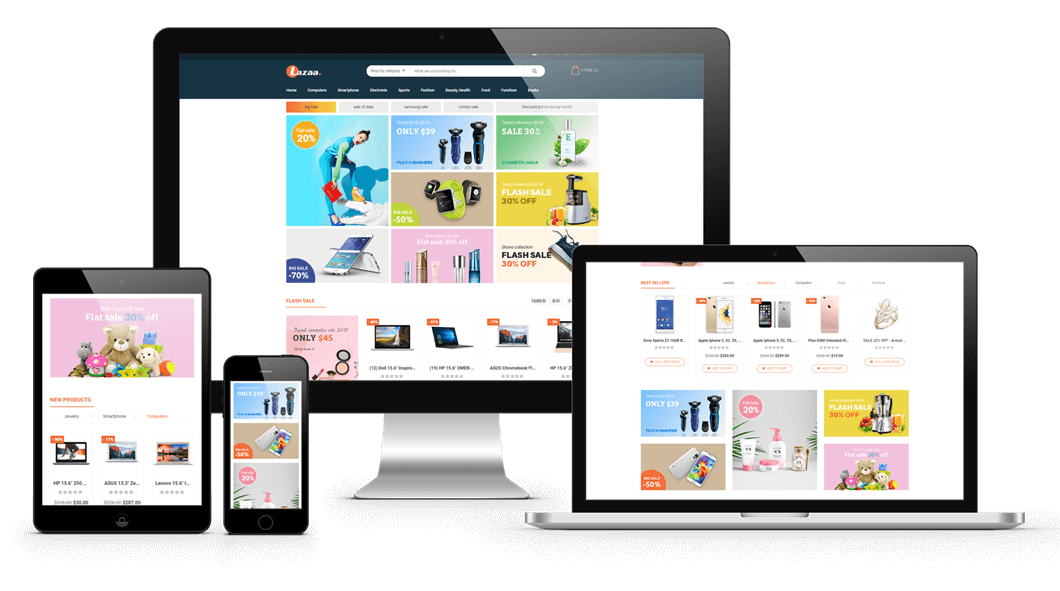
Running a single-vendor printshop often limits growth. You’re responsible for creating designs, managing inventory, and handling all fulfillment — which caps how fast you can scale. By adopting a multi-vendor solution, you open your store to new partners: designers, printers, and product suppliers who enrich your catalog while you earn commissions from every sale.
Pain of Staying Single-Vendor
A local printshop in Germany tried to expand into apparel and mugs but quickly hit capacity. With one team handling everything, they had frequent delays and refund requests from over-promising and under-delivering. Another entrepreneur in Canada wanted to run a POD marketplace but couldn’t onboard freelance designers due to the lack of a vendor portal. Both struggled with limited growth and stagnant revenue.
Case Stories: Scaling with Multi-Vendor
- Case 1: A US-based T-shirt seller transformed into a marketplace with 50+ vendors. Within six months, their product catalog tripled, and monthly revenue grew by 60%.
- Case 2: A packaging company in Singapore opened its platform to local designers. Instead of managing every template, they now receive ready-to-print files, cutting production time by 40%.
- Case 3: A European POD marketplace scaled globally by onboarding vendors in different regions, offering multi-currency and multi-language support. This boosted international sales by 35%.
What Customers and Vendors Expect
- Vendors want: a simple portal to upload products, set pricing, and manage orders.
- Customers want: variety, fast delivery, and confidence that they’re buying from trusted sellers.
- Store owners want: scalable workflows, commission tracking, and automated payouts.
Printcart’s multi-vendor solution aligns all three needs into one platform.
Printcart’s Multi-Vendor Solution
Our team sets up and configures the multi-vendor Printcart ecosystem, fully integrated with Shopify, WooCommerce, or Wix. Key features include:
- Vendor registration and management dashboard
- Commission-based payout system with flexible rules
- Vendor product uploads with design customization tools
- Print-ready file generation for automated fulfillment
- Vendor portfolio pages to showcase top sellers
- Multi-currency and multi-language support
- Marketplace reporting and analytics for admins
Learn more about Printcart Web-to-Print
The Business Outcomes You Can Expect
By expanding with Printcart’s multi-vendor solution, you will:
- Grow your product catalog exponentially by leveraging vendor contributions.
- Increase revenue through commissions and vendor fees.
- Reduce in-house workload by delegating design and product management to vendors.
- Scale internationally with global vendor support.
- Build a trusted ecosystem that attracts designers, suppliers, and repeat buyers.
“Switching to Printcart’s multi-vendor solution allowed us to onboard designers from around the world. We now offer over 2,000 customizable products, and our monthly sales have doubled.” – Robert C., POD Marketplace Owner
Ready to Expand Your Printing Business?
Don’t limit your store’s growth to a single-vendor setup. With Printcart’s multi-vendor solution, you can scale like TeeSpring, Zazzle, or Redbubble — but tailored to your needs.
Start your expansion today at Printcart Dashboard
Or talk directly with us on WhatsApp: https://wa.me/+84937869689
Boost Sales with 3D Product Previews in Your Printcart Designer
Enhance Your Store with 3D Product Previews
Are you struggling to give your customers a clear idea of how their designs will look in real life? Do you want to enhance the customer experience on your web-to-print platform and increase customer confidence in their purchases? Look no further!
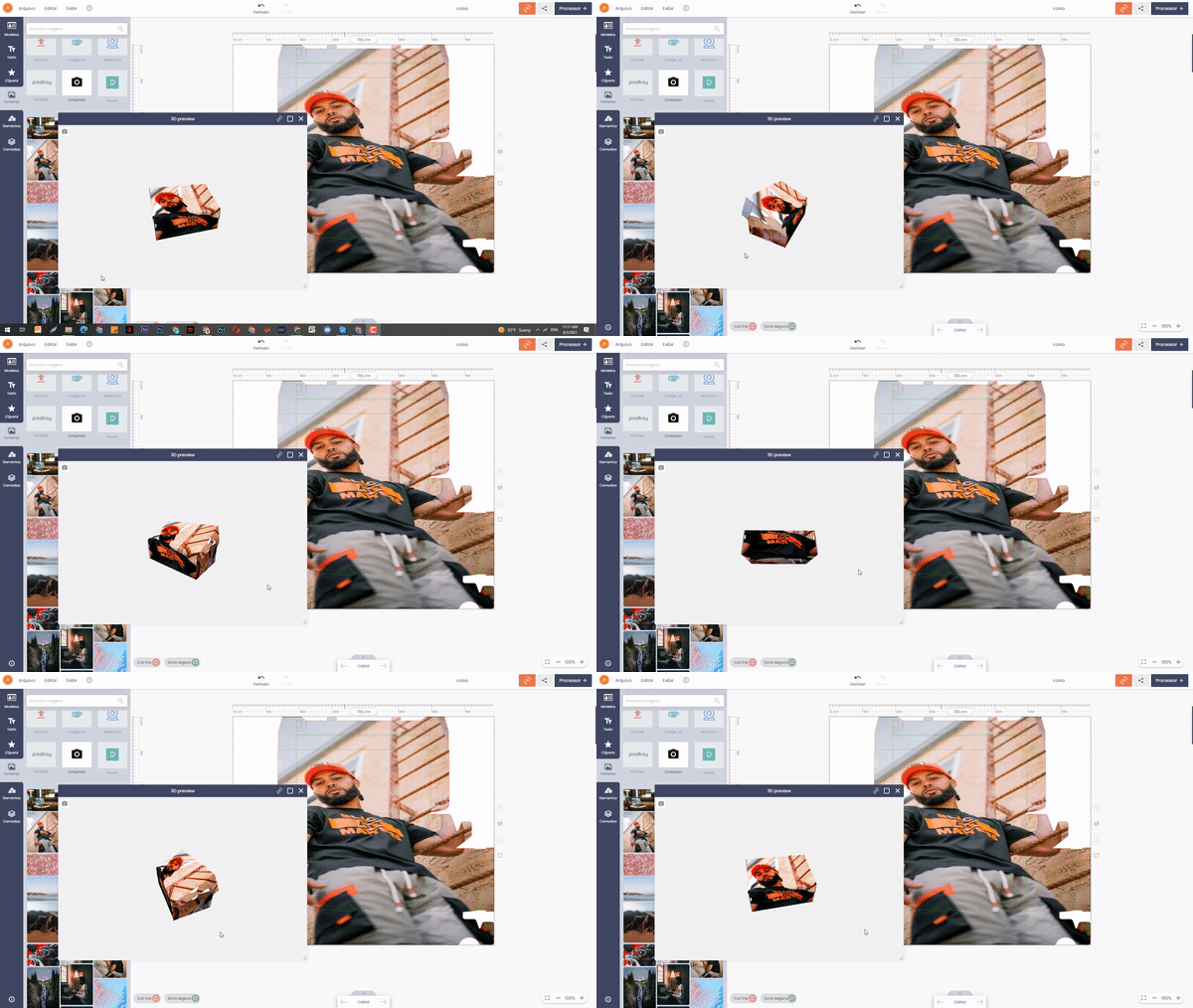
Most ecommerce printshops still rely on flat 2D previews that fail to show customers how a design wraps around a product. This often leads to mismatched expectations, refunds, and unhappy buyers. With Printcart’s 3D preview setup, you can transform your store into an interactive showroom, giving customers the confidence to order customized products without hesitation.
Why 2D Previews Hurt Your Sales
A custom mug store in the UK reported 25% of returns came from customers unhappy with how the design wrapped around the handle area. Another apparel seller struggled with low conversions because buyers couldn’t visualize text placement on sleeves.
Without accurate previews, stores face higher return rates and lose trust. By upgrading to 3D product previews, you allow customers to rotate, zoom, and inspect every angle of their design before purchase, drastically cutting down on disputes.
Case Story: Reducing Refunds with Interactive Previews
- A t-shirt shop in the US reduced refund requests by 40% after implementing 3D previews that displayed front, back, and sleeve designs in real-time.
- A packaging company used Printcart 3D previews to let B2B clients view branded boxes from all sides before placing bulk orders. This saved weeks of back-and-forth proofing.
- A mug printing store in Australia increased conversion rates by 22% after customers gained confidence seeing their artwork wrapped around the full surface.
What Customers Expect from Modern Print Shops
Today’s buyers want:
- Full control over personalization with accurate previews.
- Mobile-friendly previews that let them rotate products with a swipe.
- Instant proofing without waiting for manual mockups.
Printcart’s 3D preview setup makes all this possible while keeping your workflow automated.
What’s Included in Our Service
Our team of experienced designers will work closely with you to set up a 3D preview feature using the Printcart Product Designer. Here’s what you can expect:
- Integration of the Printcart Product Designer into your web-to-print platform
- Configuration of the 3D preview feature to fit your specific product requirements
- Creation of a 3D model of your product that accurately represents its shape and design
- Implementation of the 3D preview on your web-to-print platform, allowing customers to view and interact with their designs in 3D
- Comprehensive testing to ensure the 3D preview feature is smooth and effective
With our expertise in 3D modeling and web-to-print technology, we’ll help you provide a seamless and engaging customer experience that will set you apart from the competition.
Printcart’s 3D Preview Solution
Our setup is fully compatible with Shopify, WooCommerce, and Wix. Features include:
- Multi-angle previews for apparel, mugs, packaging, and signage
- Zoom and rotation for real-time interaction
- High-resolution rendering that matches print-ready files
- Full integration with your online designer and checkout flow
- Mobile optimization for a smooth experience across devices
The Business Outcomes You Can Expect
By enabling Printcart’s 3D preview setup, you’ll:
- Reduce refunds and disputes by up to 40%
- Increase conversion rates as buyers see exactly what they’re purchasing
- Save proofing time and costs with automated previews
- Boost customer satisfaction with a premium, professional UX
“After adding Printcart’s 3D preview, our customers stopped asking for extra mockups. They can rotate and check every angle themselves. Our support tickets dropped by 60%.” – Emma L., Custom Gift Store Owner
Ready to Upgrade Your Store with 3D Previews?
Don’t let a lack of 3D preview capabilities hold you back from growing your web-to-print business. Let us help you set up a 3D preview using the Printcart Product Designer today.
Get started now at Printcart Dashboard
Or talk directly with our consultant on WhatsApp: https://wa.me/+84937869689
Printshop Mobile App Development with Printcart – Power Your Business on the Go
Printshop Mobile App Development with Printcart – Power Your Business on the Go
In today’s ecommerce landscape, customers expect to shop, design, and order products directly from their phones. Yet many printshops still rely only on desktop websites. This creates friction, lower engagement, and missed opportunities for repeat orders. Our Printcart Mobile App Development service solves this by delivering a branded, mobile-first solution that integrates with your Printcart Product Designer and Dashboard.
Common Pain Points in Printshop Mobile App Development
- No mobile presence: customers prefer apps, but most printshops only have a website.
- Low engagement: without push notifications or loyalty features, customers forget to reorder.
- Poor integrations: third-party app builders don’t work smoothly with Printcart Designer and Printcart Dashboard.
- Limited UX: mobile design customization is often clunky, leading to cart abandonment.
- Scalability challenges: printshops struggle to manage large catalogs or multi-vendor stores on mobile.
Case Story – Apparel POD Seller:
A Shopify-based POD store relied solely on their website. 60% of visitors were mobile users, yet conversions stayed under 1.5%. After launching a custom Printcart-powered app, they added push notifications and one-click reordering, boosting mobile conversions to 3.8% within three months.
What Clients Want from a Printshop Mobile App
Businesses don’t just want an app — they need:
- Seamless integration with Printcart tools for design, orders, and workflow.
- Mobile-first UX that makes customization fast and intuitive.
- Push notifications to re-engage users with discounts, reminders, and seasonal promotions.
- Easy scaling for large catalogs and multi-vendor marketplaces.
- Brand identity built into the app with logos, fonts, and colors.
Case Story – B2B Print Provider:
A stationery supplier needed a white-label mobile app for corporate clients. With Printcart integration, employees could upload AI/SVG designs, place bulk orders, and track shipments via mobile. The supplier retained key accounts and increased B2B reorders by 20% in one quarter.
How Printcart Mobile App Development Solves These Challenges
Our consultancy delivers end-to-end mobile app development for printshops, including:
- Native mobile integration with Printcart Product Designer.
- Custom app branding (logo, colors, fonts, layouts).
- Push notification system for promotions, cart recovery, and reorders.
- Advanced catalog management with categories, filters, and design previews.
- Multi-vendor compatibility for marketplace-style apps.
- Training and onboarding so your team can manage updates without developers.
Case Story – Local Printshop Going Online:
A regional printshop wanted to digitize their services. We developed a Printcart app connected to their WooCommerce store, letting customers design business cards and flyers on mobile. Within 6 months, the shop expanded from local orders only to serving nationwide clients.
Benefits of Printshop Mobile App Development with Printcart
- Reach more customers with mobile-first engagement.
- Increase repeat orders using push notifications and loyalty tools.
- Reduce cart abandonment through smoother mobile design workflows.
- Strengthen your brand with a custom-branded app.
- Scale easily with support for multiple categories and vendors.
Related Printcart Resources
According to Statista, mobile ecommerce will account for over 60% of online sales globally in 2025. Businesses without mobile apps risk losing market share to competitors who offer mobile-first solutions.
Call to Action
Don’t let your printshop fall behind in the mobile-first era. With our Printcart Mobile App Development service, you can launch a branded, powerful app that delights your customers and drives repeat sales.
Upgrade your plan or chat with us directly on WhatsApp: https://wa.me/+84937869689.
Create Custome Request
Chose a pre-defined ecommerce tasks or send custom development request for your ecommerce business.
Work with Assistant
Coordinating with our project assistant to accomplish the store development as your expectation.
Upsale Your Business
Facilitating weekly ecommerce tasks to further improve your sales & marketing and reduce operation cost.
Leave a request today for a free consultation
Too many website owners wait until it's too late to realize they need help. Contact us today to learn more about our services and how we can help you take your website to the next level and turn your website into a revenue-generating machine.
Ms.Michelle
Skype: tramy9400
Email: support@printcart.com
Mr.Ryan
Skype: .cid.e5694f64b5c806f6
Email: sales@printcart.com
Programming & Tech LOGO & BRAND IDENTITY ECOMMERCE DEVELOPMENT SERVICES TO DEVELOP THEIR PROJECT
Frequently Asked Questions
Since 2012, PRINTCART started helping store owner, digital marketer, start ups or traditional commerce business to set up their store online with Open Sources platform like Virtuemart, Magento, WooCommerce, Shopify, BigCommerce or custom built website . Now we have tracked record of over 20K+ projects ( from 50$ - 100k$) supported by us.
And we discovered that 90% of our client faces a big problem during their ecommerce business…
The problem with our client, the store owner or shop owner or their website developer, is the costive investment of time and complicated tasks of hosting set up, storefront customize, store configuration, payment and shipping setting, extension research and customize process, open sources version upgrades,security and bug fixs, hiring and managing to work with various freelancer developers, updating with new technology, integrated with marketing & sales app, site performances and so on…
Since 2022, we think that Ecommerce Club can overall solve these problem and our client’s headache by gathering all the appropriated resources and talents into a simple approach of full services subcrition which backed by our team of extensive experience in ecommerce development and operation. From now on, our clients don’t have to deal with various tasks themeselves while focus on runing their business and support their clients.
We will try our best to handle the complicated tasks of set up and running their ecommerce website and system.
We research, train the team with SOP and set up packaged services which is clearly cover the nessesaty of each and every ecommerce operation.
The packaged Services is published widely so any shop owner, ecommerce developer can access and start using it by open ticket support and request the tasks to be done.
We try to define the services into timeframe- tasks as clear as possiple and improve the process of task implementation for both our staff as well as club member who need the task to be done well
Shop owner can open unlimited task as well as they want, or they can cancel their development resources if they don’t need any more.
From open sources template and plugin installation to enterprise website development and customization, we tried to open support for as much as possiple. In fact we support well – known open sources ecommerce platform like Magento, Shopify, WooCommerce, Headless Commerce…as well as Custom Development like React, Vue, JS, HTML
For store and sales operation, we are trying to help our shop owner with content and product development, landing page set up and development, sales and marketing features intergations, payment gate way development, shipping and fullfillment api intergration,CRM, erp and accounting, mobile app development …
For sales and marketing, we want to be helpful in tasks of promotion banner design, graphic design, facebook marketing support, youtube marketing support, adword campaign, newsletter set up, SEO, social media management…
For ecommerce industry and know how, we try to support as much as possiple retail shopping, web 2 print solution, booking business, company website with or without shopping cart..
We are adding more and more ecommerce services monthly so store owner can select and decide to use the services that best suited to their need at the right time.
Store owner can assign different stores development projects to us at the same time. Our team will find the approachs to alllocate the development resources to meet up with your bsuiness demand
No! We’ll work with any website regardless of where it's hosted.
We understand that different websites have different needs and that people have realistic budgets that they have to meet.
That being said, we may not be able to achieve your speed and security goals on a shared hosting provider. If you'd like to upgrade, we have a great list of recommendations and trusted hosting partners.
Firstly, you will need to understand and define the project requirement and what includes and not included in each services that you want us to do.
Later, you need to prepare the budget and the timeframe to work with our developer to review the accomplisted tasks or projects.
You should also invite more team member to join the project development team
Our Ecommerce Service is for all ecommerce partners that wants to
1
Outsource your Ecommerce Business with a Know-How Tech Team Supported by a Smart Management Tool
2
Manage your Store Development project from small front-end tasks to full project development in Agile Approach
3
Develop and deploy any Complex eCommerce Marketplace or integrate CRM, ERP system to your platform business